
The product with the longest feature list isn’t automatically the best fit. A technical product comparison for B2B sales is most useful when buyers are choosing between alternatives for a defined business need. The comparison should clarify which differences affect the decision, which requirements are essential, and where each option involves a tradeoff. That gives the sales team a practical basis for guiding a discussion instead of relying on a broad feature rundown.
Comparison gets harder when a purchase involves several roles. A technical evaluator may focus on architecture, while an operations leader weighs workflow fit and an executive considers business priorities. If each audience receives disconnected claims, buyers can struggle to form a shared view of the options. A structured comparison gives those conversations a common reference without assuming every stakeholder values the same criteria.
This article explains when to compare products and how to assess positioning, customer priorities, business benefits, differentiation, and features. It also covers how to organize evidence about performance, compatibility, security, and scalability. Use these steps to make product distinctions clearer, keep claims grounded in buyer needs, and support more informed sales conversations.
Key Takeaways
- Compare products when a buying decision depends on meaningful differences, and define the customer’s priority before evaluating features.
- Connect each technical capability to a customer problem, an operational improvement, and a business outcome.
- Assess differentiation across product functionality and less tangible factors such as design, implementation, and market fit.
- Use consistent, weighted criteria to evaluate performance, compatibility, security, and scalability from the buyer’s perspective.
- Align product positioning and sales messaging with the priorities of the specific audiences involved in the decision.
Product category and positioning
A product category tells buyers what kind of solution they’re evaluating; positioning clarifies its intended customer and use case. Before comparing products, define the decision: what must the solution help the organization do, and which alternatives could meet that need? For example, a manufacturer considering production reporting might compare software with its existing manual process, not just with another software platform.
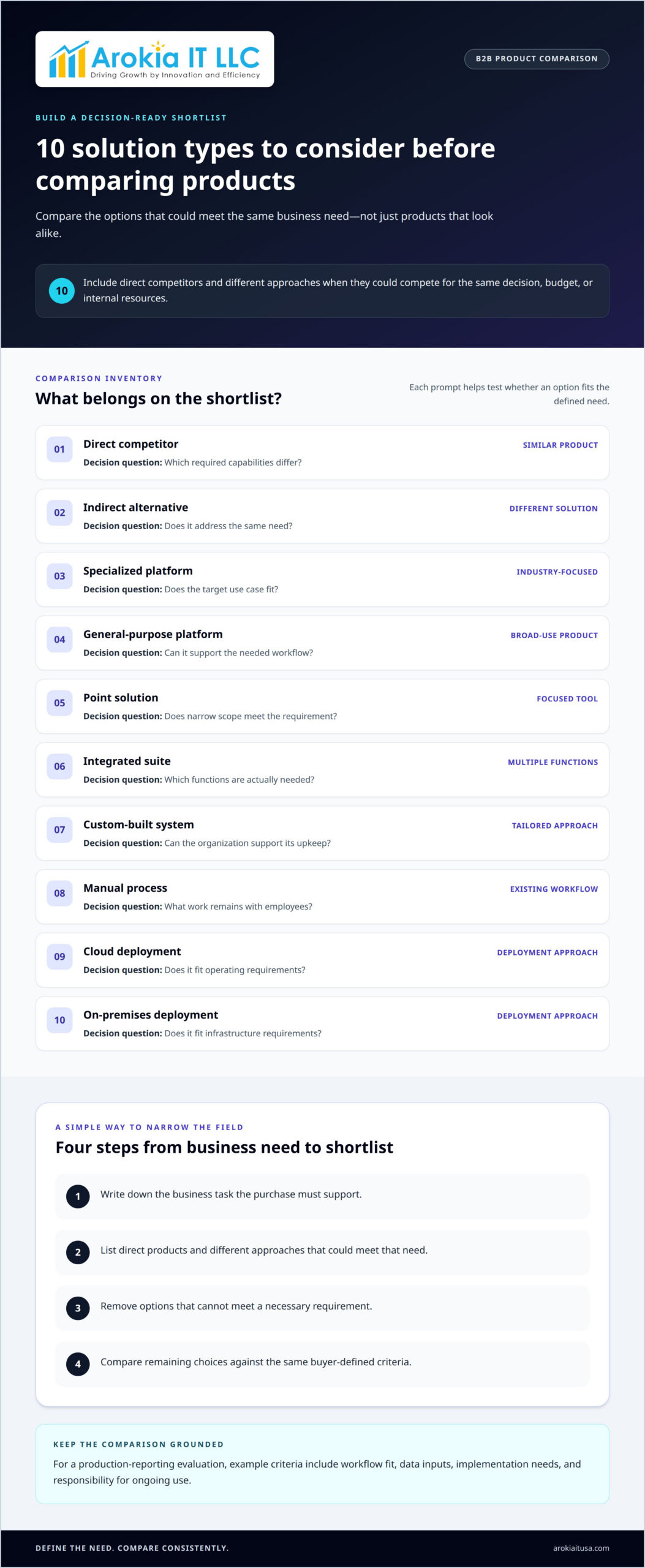
Separate direct competitors from indirect alternatives. A direct competitor offers a similar product in the same market; an indirect alternative takes a different approach to the same need. Include both if they could compete for the same decision, budget, or internal resources. The table below presents ten solution types to consider. Its prompts guide comparison, rather than make claims about specific vendors.
| Option | Category | Decision criterion |
|---|---|---|
| Direct competitor | Similar product | Which required capabilities differ? |
| Indirect alternative | Different solution | Does it address the same need? |
| Specialized platform | Industry-focused | Does the target use case fit? |
| General-purpose platform | Broad-use product | Can it support the needed workflow? |
| Point solution | Focused tool | Does narrow scope meet the requirement? |
| Integrated suite | Multiple functions | Which functions are actually needed? |
| Custom-built system | Tailored approach | Can the organization support its upkeep? |
| Manual process | Existing workflow | What work remains with employees? |
| Cloud deployment | Deployment approach | Does it fit operating requirements? |
| On-premises deployment | Deployment approach | Does it fit infrastructure requirements? |
Use consistent criteria across the shortlist. For a plant evaluating production-reporting options, these might include workflow fit, data inputs, implementation needs, and responsibility for ongoing use. Keep the comparison specific to the decision. A broad category label alone won’t explain why an option belongs in the evaluation.
Use this decision guide to narrow the field:
- Write down the business task the purchase must support.
- List direct products and different approaches that could meet that need.
- Remove options that cannot meet a necessary requirement.
- Compare remaining choices against the same buyer-defined criteria.
Finally, check whether the category and message match the target market. If proposals repeatedly need custom explanations, or marketing interest rarely becomes qualified demand, revisit product positioning before expanding outreach. A useful comparison helps buyers see which options merit evaluation and why.
The review should ask whether the offer’s capabilities serve a defined market opportunity and whether the business has a repeatable path to revenue. That connection keeps category choices tied to commercial aims rather than labels alone. It also helps teams decide which messages belong in the comparison and what buyers need to assess fit.
B2B product strategy connects product capabilities with a specific market opportunity and a repeatable path to revenue. B2B product strategy determines what an offer means, product marketing expresses that meaning for buyers, and SEO makes the information discoverable through search. When a B2B offer is unclear, increased marketing traffic can lead to low-quality leads, longer qualification calls, custom proposals, discount pressure, and slower sales cycles. Clear positioning can help align category, buyer message, and discovery with the intended market, while keeping evaluation anchored in the need and criteria already defined.
Translating technical capabilities into business benefits
Technical language earns attention only when buyers can connect it to work they need done. The listed buyer priorities assign 28% to matching relevant capabilities with specific problems. Use that priority to frame each product claim around the customer’s operating context, rather than assuming a specification explains its own value.
Build a benefit statement by tracing a capability through the work it changes. Consider automated data collection from multiple systems. Identify who gathers the information now, where it comes from, and how it is used. The message can then explain that automation reduces manual information gathering and supports more consistent reporting. That operational effect may help teams make decisions using a shared view of the data.
Keep the chain of reasoning grounded. A capability alone doesn’t prove a financial outcome. If a product gives users faster access to information, don’t automatically claim it increases revenue or reduces operating costs. Explain the immediate effect, then identify other factors that influence business results, such as adoption, process ownership, and source-data quality. This distinction makes sales conversations more credible and sets accurate expectations.
- Start with the user’s task. Name the person, work, and friction point, such as an analyst assembling reports from separate systems.
- Describe the capability in context. Explain what the product does during that task, not just its technical label.
- State the operational change. Show what becomes easier, more consistent, or less manual.
- Connect to the business objective. Relate the operational effect to a buyer priority without promising an outcome the evidence cannot support.
- Choose proof that fits the claim. Use a demonstration, documentation, or an implementation example to show how the capability works.
Different stakeholders need different evidence. A technical evaluator may want to see how data moves between systems. An operations leader may need a walkthrough of the revised task. A finance stakeholder may want to understand which process changes could affect resource use. Keep the core claim consistent, but choose examples that address each audience’s practical concerns.
Apply the same discipline to comparison materials. Rather than listing “automated collection” as a standalone advantage, describe the task it supports and what buyers can observe in a demonstration. Separate documented capabilities from expected effects, and make dependencies clear. This helps sales teams answer follow-up questions without stretching claims beyond the evidence.
When product details are technically accurate but difficult for buyers to interpret, discuss buyer-focused product content that makes the connection clearer. Strong messaging doesn’t simplify away technical substance; it gives each capability a clear business context.
Differentiation in B2B technology
Sales teams can build an accurate competitor comparison matrix by defining customer-relevant criteria and recording each claim with traceable evidence. Use product documentation, demonstrations, and direct observations. Mark unsupported claims as unknown rather than presenting them as facts.
Differentiate on customer value, not a longer feature list. A B2B technology product may stand apart through industry focus, simpler implementation, combined capabilities, localization, deployment, support, or commercial model. For example, a platform designed around a manufacturer’s operating environment may fit better than a broader tool, even if both cover similar functions.
Test each proposed advantage against four layers: basic, anticipated, improved, and potential benefits. Basic benefits meet the core need. Anticipated benefits match what buyers expect from the category. Improved benefits offer a meaningful advantage, such as a simpler rollout. Potential benefits point to future value, but shouldn’t be presented as current capabilities.
A comparison matrix turns these distinctions into practical sales enablement. Keep criteria consistent across competitors and connect every entry to a customer priority. For a software platform, criteria might include workflow fit, implementation effort, integration options, and support model. Note whether the evidence comes from published documentation, a product demonstration, or a buyer-facing conversation.
- Define the target. Select the buyer role and use case the comparison serves.
- Set the criteria. Choose customer priorities before scoring products.
- Record evidence. Capture the supporting document, demo observation, or specific source.
- Separate fact from interpretation. Label observed capabilities separately from sales conclusions.
- Review the matrix. Update entries when product information or customer needs change.
Use a radar chart to focus discussion, not to declare a universal winner. A B2B product radar chart typically compares five or six attributes or capabilities. Choose attributes buyers value, then show where the product has a clear competitive advantage. Consistent scoring matters; otherwise, the chart may reflect internal assumptions instead of customer priorities.
Competitive differentiation analysis should consider design and branding alongside functional features. These non-functional attributes can shape buyer perception, but their relevance depends on the decision. A technical evaluator may prioritize integration documentation, while an executive may focus on strategic fit. Tailor sales enablement materials to each audience without changing the underlying evidence.
Finally, turn the strongest supported differences into a clear message. State the target customer, the problem, the defensible distinction, and the evidence. Product and marketing teams can use these signals to refine positioning and identify practical ways to differentiate, rather than relying on broad claims any competitor could make.
Functional and non-functional product features
Compare what a product does separately from how it performs for users. Workflow automation, for example, is functional; interface design is non-functional.
Functional Product Features
Functional features are the actions and workflows a product supports. A sales platform might capture account activity, route leads, and record customer engagement. Compare whether each product supports the same tasks, how users complete them, and where manual work remains. A feature checklist should distinguish a complete workflow from a single function, such as recording an interaction without routing follow-up.
Then assess functional differences against the intended use case. If a team needs to connect account records with service history, compare how each product handles that sequence. Note configuration needs, dependencies, and relevant limits in the same row. A broad label such as “account management” can obscure meaningful differences in what users can do.
Performance and Compatibility
Performance describes how a product behaves in use; compatibility describes how it works with existing systems and processes. For a reporting platform, compare response during a routine task, data handling, and supported connections to the buyer’s current tools. Use the same workflow and comparable conditions in each demonstration so differences reflect product behavior, not setup.
Compatibility also includes fit with user roles and established workflows. A system may connect technically yet create duplicate data entry or disrupt approvals. Map the path from source system to user action, then record where each product requires configuration, an extra step, or a process change.
Non-functional features shape usability and perception, even when they don’t add a task. Interface clarity, navigation, design, and branding can affect how easily users understand a platform. For example, compare the steps to find an account record, review its activity, and assign follow-up. Describe observed differences instead of treating design preference as a universal advantage.
Separate required criteria from preferences before scoring. A required function supports a necessary workflow; a preference may improve adoption or engagement but won’t determine technical fit. For example, an operations team may require role-based views, while a particular dashboard layout remains optional. This distinction prevents a polished interface from outweighing a missing core function.
- Function: Record the user task and the product action that supports it.
- Performance: Compare the same task under consistent demonstration conditions.
- Compatibility: Map connections, data movement, and workflow dependencies.
- Usability: Note navigation steps and role-specific experience.
- Evidence: Label each finding as documented, demonstrated, or requiring further evaluation.
Attach evidence to every comparison entry. A demonstration can show how a workflow operates; product documentation can explain supported functions. Distinguish both from assumptions about future implementation. This precision helps technical evaluators assess fit and gives sales teams clear, defensible language for each account.
How do B2B teams compare product performance, compatibility, security, and scalability?
Use the same customer scenario to evaluate each product across four dimensions. For a manufacturing platform, that scenario might involve reviewing equipment data, connecting existing systems, controlling access, and supporting additional sites.
Performance: Define the task before comparing speed or responsiveness. For example, have each platform retrieve the same report using comparable data and configuration. Record what users observe, such as delays, incomplete results, or extra steps. A demonstration is useful, but its results apply only to the tested scenario. Keep test conditions consistent so the comparison reflects product behavior rather than setup differences.
Compatibility: Map how data moves between the product and the buyer’s current tools. An architecture overview and integration documentation can help technical evaluators assess connections, dependencies, and required configuration. Trace a specific workflow, such as sending production data into a reporting platform. Note where data must be reformatted or handled manually. A connection listed on paper may still create operational work in practice.
Security: Compare the documentation and product evidence relevant to the buyer’s requirements. Review how the product describes user access, data handling, and security controls. Identify the materials supporting each statement, such as technical documentation or a product demonstration. Don’t treat a general security claim as proof that every requirement is met. Procurement teams may also need vendor and compliance information to assess supplier risk and reliability.
Scalability: Assess whether the product can support expected growth in users, locations, data, or workflows. For example, a company adding another facility should understand how the product handles additional site data and users. Review architecture overviews and implementation examples for relevant constraints. Separate current capabilities from assumptions about future capacity, and record what changes as the organization expands.
A weighted scorecard keeps the four dimensions tied to buyer priorities. Rate each attribute’s importance from the customer’s perspective, then score products using consistent evidence. A radar chart can rate each product from 0 to 5 per attribute. Use the visual to prompt discussion, not to hide the supporting details.
- Set the scenario. Choose one realistic workflow and consistent evaluation conditions.
- Define the criteria. Specify what acceptable performance, compatibility, security, and scalability mean for the buyer.
- Collect evidence. Use technical documentation, demonstrations, and architecture overviews.
- Score and explain. Record each rating, its evidence, and its importance to the customer.
- Revisit the comparison. Update the template as products and market alternatives change.
Complex B2B products require buyer research, comparison, evaluation, and agreement. Green and red icons show feature presence; black and white circles show coverage. Weighted scorecards rank customer priorities; templates regularly evaluate and track competitors.
Arokia IT
Arokia IT LLC helps B2B companies connect product positioning with the buyers and accounts they need to reach. When technical differences are difficult to communicate consistently, its Account-Based Marketing (ABM), Demand Generation, LinkedIn Marketing, and AI Search & GEO can support clearer market visibility and sales alignment.
This support is relevant when product comparisons reveal a meaningful distinction, but target buyers don’t understand its practical value. Clear messaging helps technical and business audiences evaluate the same product according to their priorities, without overstating capabilities.
Make the comparison a shared sales tool
A technical product comparison for B2B sales can become more than a buyer-facing document. Treat it as a working reference that helps product, marketing, and sales teams use consistent language as customer priorities shift. When teams capture why each distinction matters, future conversations can start with the buyer’s decision criteria instead of rebuilding the explanation from scratch.
The next step is to identify where product knowledge breaks down. Are buyers unclear about the use case? Do sales conversations depend on explanations that aren’t reflected in marketing materials? Are technical distinctions hard to find before a meeting? These gaps show where clearer positioning and buyer-focused communication can support the sales process.
Build from the evidence, keep the message grounded in buyer priorities, and give every customer-facing team a clearer basis for productive conversations.
Frequently Asked Questions
When should a B2B team compare products?
Compare products when a purchase, replacement, or expansion requires a choice between credible alternatives. Comparison is especially useful when operations, IT, and finance have different approval criteria. For example, a manufacturer adding a facility in Texas or Oklahoma may need to assess whether a platform fits the new site and existing processes. Start before final approval, while the team can still resolve requirements and tradeoffs.
What is a technical product comparison for B2B sales?
A technical product comparison for B2B sales is a structured evaluation of products against requirements that matter to a business buyer. It helps explain how each option supports the intended use, rather than treating every feature as equally valuable. A useful comparison also gives sales and technical teams a consistent reference for discussions, demonstrations, and proposals, reducing ambiguity about what each product can do for a specific account.
Which technical specifications should B2B buyers compare across products?
Compare specifications relevant to the intended environment and workload: supported data formats, interface requirements, capacity limits, deployment prerequisites, administration controls, and maintenance needs. For example, a buyer connecting a platform to existing equipment should examine supported interfaces and data handling, not just the feature name. Request comparable documentation for each product and note dependencies that could affect installation, daily operation, or future changes.
What pricing, implementation, integration, and total cost of ownership factors should B2B comparisons include?
Compare pricing models such as per-user, per-location, per-transaction, or feature-tier pricing. Check what the price includes, including features, add-ons, usage limits, upgrades, implementation, and customization. Assess implementation effort and integration options, and identify costs that are difficult to estimate or unpredictable so buyers can judge total cost.